3.3.11.1. Flash-API

3.3.11.1.1. Introduction

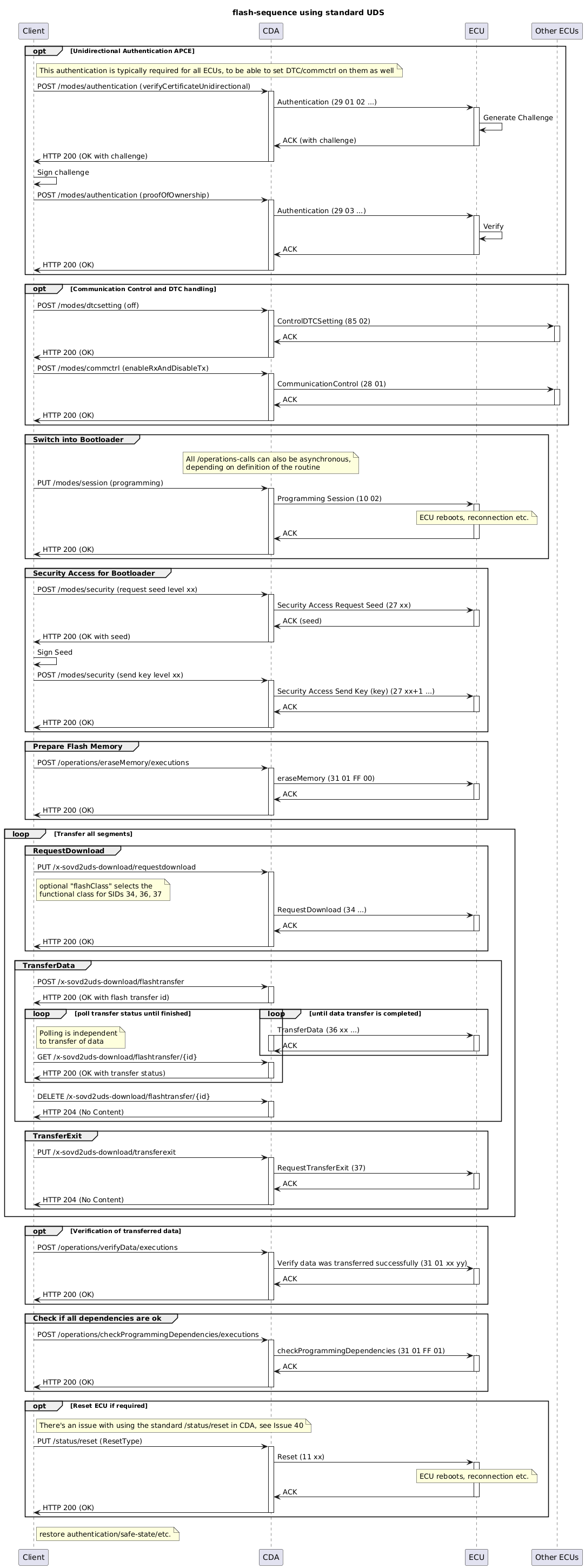
Flashing via UDS generally follows the following sequence. OEMs might choose to call additional services or modify the sequence.
' SPDX-FileCopyrightText: 2026 Copyright (c) Contributors to the Eclipse Foundation
'
' See the NOTICE file(s) distributed with this work for additional
' information regarding copyright ownership.
'
' This program and the accompanying materials are made available under the
' terms of the Apache License Version 2.0 which is available at
' https://www.apache.org/licenses/LICENSE-2.0
'
' SPDX-License-Identifier: Apache-2.0

@startuml
title flash-sequence using standard UDS

participant Client
participant CDA
participant ECU
participant "Other ECUs" as OtherECUs

!pragma teoz true

opt Unidirectional Authentication APCE
    note right of Client : This authentication is typically required for all ECUs, to be able to set DTC/commctrl on them as well
    Client -> CDA : POST /modes/authentication (verifyCertificateUnidirectional)
    activate CDA
    CDA -> ECU : Authentication (29 01 02 ...)
    activate ECU
    ECU -> ECU : Generate Challenge
    ECU -> CDA : ACK (with challenge)
    deactivate ECU
    CDA -> Client : HTTP 200 (OK with challenge)
    deactivate CDA

    Client -> Client : Sign challenge

    Client -> CDA : POST /modes/authentication (proofOfOwnership)
    activate CDA
    CDA -> ECU : Authentication (29 03 ...)
    activate ECU
    ECU -> ECU : Verify
    ECU -> CDA : ACK
    deactivate ECU
    CDA -> Client : HTTP 200 (OK)
    deactivate CDA
end

opt Communication Control and DTC handling
    Client -> CDA : POST /modes/dtcsetting (off)
    activate CDA
    CDA -> OtherECUs : ControlDTCSetting (85 02)
    activate OtherECUs
    OtherECUs -> CDA : ACK
    deactivate OtherECUs
    CDA -> Client : HTTP 200 (OK)
    deactivate CDA

    Client -> CDA : POST /modes/commctrl (enableRxAndDisableTx)
    activate CDA
    CDA -> OtherECUs : CommunicationControl (28 01)
    activate OtherECUs
    OtherECUs -> CDA : ACK
    deactivate OtherECUs
    CDA -> Client : HTTP 200 (OK)
    deactivate CDA
end

group Switch into Bootloader
    note over CDA: All /operations-calls can also be asynchronous,\ndepending on definition of the routine

    Client -> CDA : PUT /modes/session (programming)
    activate CDA
    CDA -> ECU : Programming Session (10 02)
    activate ECU
    note over ECU : ECU reboots, reconnection etc.
    ECU -> CDA : ACK
    deactivate ECU
    CDA -> Client : HTTP 200 (OK)
    deactivate CDA
end

group Security Access for Bootloader
    Client -> CDA : POST /modes/security (request seed level xx)
    activate CDA
    CDA -> ECU : Security Access Request Seed (27 xx)
    activate ECU
    ECU -> CDA : ACK (seed)
    deactivate ECU
    CDA -> Client : HTTP 200 (OK with seed)
    deactivate CDA

    Client -> Client : Sign Seed

    Client -> CDA: POST /modes/security (send key level xx)
    activate CDA
    CDA -> ECU : Security Access Send Key (key) (27 xx+1 ...)
    activate ECU
    ECU -> CDA : ACK
    deactivate ECU
    CDA -> Client : HTTP 200 (OK)
    deactivate CDA
end

group Prepare Flash Memory
    Client -> CDA: POST /operations/eraseMemory/executions
    activate CDA
    CDA -> ECU : eraseMemory (31 01 FF 00)
    activate ECU
    ECU -> CDA : ACK
    deactivate ECU
    CDA -> Client : HTTP 200 (OK)
    deactivate CDA
end

loop Transfer all segments
    group RequestDownload
        Client -> CDA: PUT /x-sovd2uds-download/requestdownload
        activate CDA
        CDA -> ECU : RequestDownload (34 ...)
        activate ECU
        ECU -> CDA : ACK
        deactivate ECU
        CDA -> Client: HTTP 200 (OK)
        deactivate CDA
    end

    group TransferData
        Client -> CDA: POST /x-sovd2uds-download/flashtransfer
        activate CDA
        CDA -> Client: HTTP 200 (OK with flash transfer id)
        deactivate CDA

        loop until data transfer is completed
            CDA -> ECU: TransferData (36 xx ...)
            activate CDA
            activate ECU
            ECU -> CDA : ACK
            deactivate ECU
            deactivate CDA
        end
        & loop poll transfer status until finished
            note right of Client: Polling is independent\nto transfer of data
            Client -> CDA: GET /x-sovd2uds-download/flashtransfer/{id}
            activate CDA
            CDA -> Client: HTTP 200 (OK with transfer status)
            deactivate CDA
        end
    end

    group TransferExit
        Client -> CDA: PUT /x-sovd2uds-download/transferexit
        activate CDA
        CDA -> ECU : RequestTransferExit (37)
        activate ECU
        ECU -> CDA : ACK
        deactivate ECU
        CDA -> Client: HTTP 200 (OK)
        deactivate CDA
    end
end

opt Verification of transferred data
    Client -> CDA: POST /operations/verifyData/executions
    activate CDA
    CDA -> ECU : Verify data was transferred successfully (31 01 xx yy)
    activate ECU
    ECU -> CDA : ACK
    deactivate ECU
    CDA -> Client: HTTP 200 (OK)
    deactivate CDA
end


group Check if all dependencies are ok
    Client -> CDA: POST /operations/checkProgrammingDependencies/executions
    activate CDA
    CDA -> ECU: checkProgrammingDependencies (31 01 FF 01)
    activate ECU
    ECU -> CDA : ACK
    deactivate ECU
    CDA -> Client: HTTP 200 (OK)
    deactivate CDA
end

opt Reset ECU if required
    note right of Client: There's an issue with using the standard /status/reset in CDA, see Issue 40
    Client -> CDA: PUT /status/reset (ResetType)
    activate CDA
    CDA -> ECU: Reset (11 xx)
    activate ECU
    note over ECU : ECU reboots, reconnection etc.
    ECU -> CDA : ACK
    deactivate ECU
    CDA -> Client: HTTP 200 (OK)
    deactivate CDA
end

note right of Client: restore authentication/safe-state/etc.
@enduml

To allow the flashing functionality shown above, the SOVD-API from ISO 17978-3 needs to be extended with the functionality defined in this document.

The standard doesn’t define how the required services should be mapped in the Classic Diagnostic Adapter.

3.3.11.1.2. API

Software Architecture: Management of flash files arch~sovd-api-flash-file-management
status: draft

Motivation

To flash an ECU, the CDA needs to have access to the files that should be flashed. This API allows listing the files that are available for flashing.

Endpoints

Flash file management

Method

Path

Description

Notes

GET

/apps/sovd2uds/bulk-data/flashfiles

Returns a list of entries that represent files in the configured flash folder and its subfolders.

Flash folder needs to be configured

' SPDX-FileCopyrightText: 2026 Copyright (c) Contributors to the Eclipse Foundation
'
' See the NOTICE file(s) distributed with this work for additional
' information regarding copyright ownership.
'
' This program and the accompanying materials are made available under the
' terms of the Apache License Version 2.0 which is available at
' https://www.apache.org/licenses/LICENSE-2.0
'
' SPDX-License-Identifier: Apache-2.0

@startuml
title Flash File Management

participant Client
participant "HTTP Server\n(Axum)" as HTTP
participant "Security\nMiddleware" as SEC
participant "Flash Handler" as HANDLER
participant "File System" as FS

Client -> HTTP : GET /apps/sovd2uds/bulk-data/flashfiles
activate HTTP

HTTP -> SEC : authenticate & authorize
activate SEC
SEC -> HTTP : OK
deactivate SEC

HTTP -> HANDLER : route to flash handler
activate HANDLER

HANDLER -> FS : list configured flash folder\n(recursive)
activate FS
FS -> HANDLER : list of files and metadata
deactivate FS

HANDLER -> HANDLER : build response with\nfile entries
HANDLER -> HTTP : JSON body
deactivate HANDLER

HTTP -> Client : HTTP 200 OK\n{ "items": [ { "id": "...", "name": "...", ... }, ... ] }
deactivate HTTP

@enduml

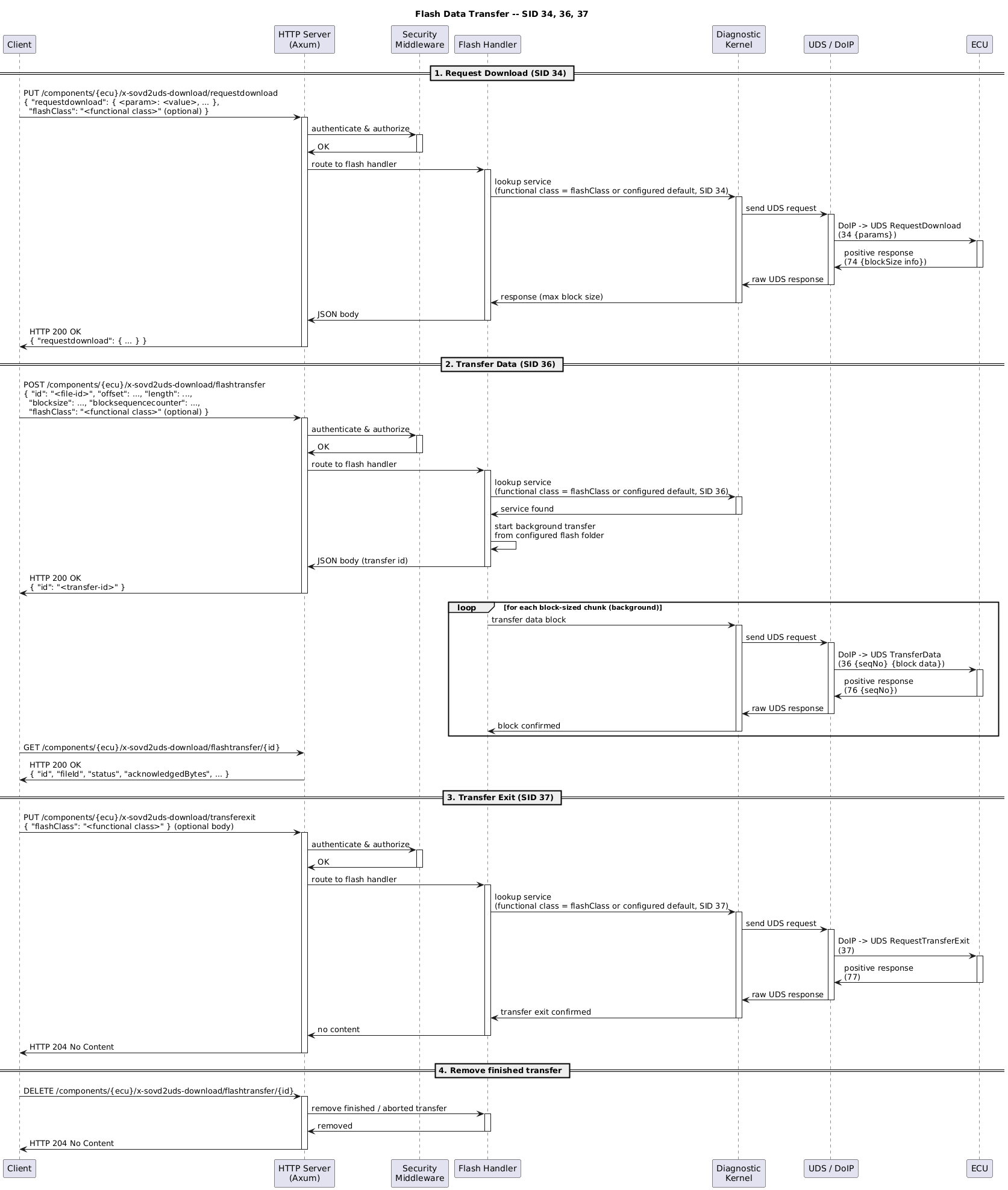
Software Architecture: Flash data transfer arch~sovd-api-flash-data-transfer
status: draft
links incoming: req~sovd-api-flashing

Motivation

To flash an ECU, the CDA needs to be able to transfer the flash data to the ECU. This API allows transferring the data in block-sized chunks, as required by UDS.

Endpoints

All paths are prefixed with /components/{ecu-name}.

Flash data transfer endpoints

Method

Path

Description

Notes

PUT

/x-sovd2uds-download/requestdownload

Calls the RequestDownload service 34~16~

Returns the response of the RequestDownload service

POST

/x-sovd2uds-download/flashtransfer

Transfers data in the file given by id from an offset for a given length, using configurable chunk sizes (block size), and a configurable starting sequence number. It uses repeated calls to service 36~16~ to transfer the data.

Returns an object with an id to be used to retrieve status. Plans: The API will be extended to also allow starting the transfer directly with absolute file paths.

GET

/x-sovd2uds-download/flashtransfer

Retrieve the ids of the running flash transfers

GET

/x-sovd2uds-download/flashtransfer/{id}

Retrieve the status of the transfer with id

PUT

/x-sovd2uds-download/transferexit

Calls the RequestTransferExit service 37~16~

Returns the response of the RequestTransferExit service

' SPDX-FileCopyrightText: 2026 Copyright (c) Contributors to the Eclipse Foundation
'
' See the NOTICE file(s) distributed with this work for additional
' information regarding copyright ownership.
'
' This program and the accompanying materials are made available under the
' terms of the Apache License Version 2.0 which is available at
' https://www.apache.org/licenses/LICENSE-2.0
'
' SPDX-License-Identifier: Apache-2.0

@startuml
title Flash Data Transfer -- SID 34, 36, 37

participant Client
participant "HTTP Server\n(Axum)" as HTTP
participant "Security\nMiddleware" as SEC
participant "Flash Handler" as HANDLER
participant "Diagnostic\nKernel" as DIAG
participant "UDS / DoIP" as COMM
participant ECU

== 1. Request Download (SID 34) ==

Client -> HTTP : PUT /components/{ecu}/x-sovd2uds-download/requestdownload\n{ parameters }
activate HTTP

HTTP -> SEC : authenticate & authorize
activate SEC
SEC -> HTTP : OK
deactivate SEC

HTTP -> HANDLER : route to flash handler
activate HANDLER

HANDLER -> DIAG : request download
activate DIAG
DIAG -> COMM : send UDS request
activate COMM
COMM -> ECU : DoIP -> UDS RequestDownload\n(34 {params})
activate ECU
ECU -> COMM : positive response\n(74 {blockSize info})
deactivate ECU
COMM -> DIAG : raw UDS response
deactivate COMM
DIAG -> HANDLER : response (max block size)
deactivate DIAG

HANDLER -> HTTP : JSON body
deactivate HANDLER
HTTP -> Client : HTTP 200 OK\n{ response data }
deactivate HTTP

== 2. Transfer Data (SID 36) ==

Client -> HTTP : POST /components/{ecu}/x-sovd2uds-download/flashtransfer\n{ "id": "<file-id>", "offset": ..., "length": ..., ... }
activate HTTP

HTTP -> SEC : authenticate & authorize
activate SEC
SEC -> HTTP : OK
deactivate SEC

HTTP -> HANDLER : route to flash handler
activate HANDLER

HANDLER -> HANDLER : read file data from\nconfigured flash folder

loop for each block-sized chunk
    HANDLER -> DIAG : transfer data block
    activate DIAG
    DIAG -> COMM : send UDS request
    activate COMM
    COMM -> ECU : DoIP -> UDS TransferData\n(36 {seqNo} {block data})
    activate ECU
    ECU -> COMM : positive response\n(76 {seqNo})
    deactivate ECU
    COMM -> DIAG : raw UDS response
    deactivate COMM
    DIAG -> HANDLER : block confirmed
    deactivate DIAG
end

HANDLER -> HTTP : JSON body (transfer id)
deactivate HANDLER
HTTP -> Client : HTTP 202 Accepted\n{ "id": "<transfer-id>" }
deactivate HTTP

== 3. Transfer Exit (SID 37) ==

Client -> HTTP : PUT /components/{ecu}/x-sovd2uds-download/transferexit
activate HTTP

HTTP -> SEC : authenticate & authorize
activate SEC
SEC -> HTTP : OK
deactivate SEC

HTTP -> HANDLER : route to flash handler
activate HANDLER

HANDLER -> DIAG : request transfer exit
activate DIAG
DIAG -> COMM : send UDS request
activate COMM
COMM -> ECU : DoIP -> UDS RequestTransferExit\n(37)
activate ECU
ECU -> COMM : positive response\n(77)
deactivate ECU
COMM -> DIAG : raw UDS response
deactivate COMM
DIAG -> HANDLER : transfer exit confirmed
deactivate DIAG

HANDLER -> HTTP : JSON body
deactivate HANDLER
HTTP -> Client : HTTP 200 OK
deactivate HTTP

@enduml

3.3.11.1.3. Configuration

Software Architecture: Flash folder configuration arch~sovd-api-flash-folder-configuration
status: draft

Motivation

The CDA needs to know where to find the files that should be flashed to the ECUs. This configuration allows setting the flash folder.

Configuration Parameter

The following configuration parameter must be available in the CDA configuration:

  • flash_files_path: Path to the folder where flash files are stored. The CDA must search this folder and its

    subfolders for files available through the bulk-data/flashfiles endpoints.