3.5. Diagnostic Tester

The Diagnostic Tester component provides the core functionality for communicating with vehicle ECUs using UDS (Unified Diagnostic Services) over DoIP (Diagnostics over IP). This document defines its architecture.

3.5.1. Startup Behavior

3.5.1.1. Startup Sequence

Software Architecture: Startup Sequence arch~dt-startup-sequence
status: draft
links incoming: req~dt-startup-sequence

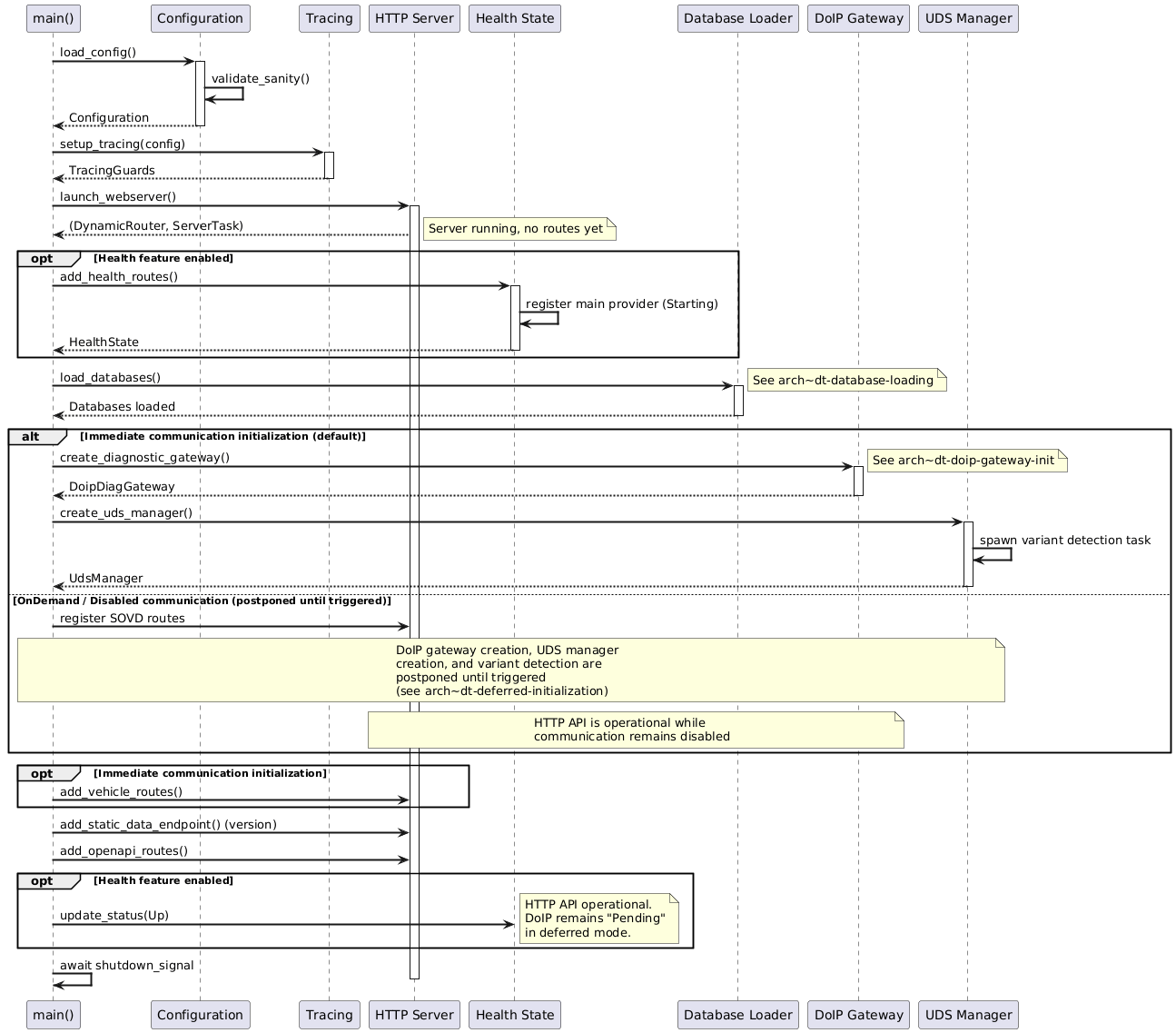
The CDA startup is orchestrated by the main application entry point, which coordinates initialization of all subsystems in a defined order to ensure proper dependency resolution and graceful degradation on partial failures.

Component Initialization Order

The startup sequence proceeds through the following phases:

  1. Configuration Phase: Load configuration from TOML file, apply CLI argument overrides, and validate configuration sanity before proceeding. If the configuration file cannot be loaded (e.g., file not found, parse error), the system falls back to default configuration values and logs a warning. Configuration validation failures after loading are fatal and prevent startup.

  2. Tracing Phase: Initialize logging and tracing subsystems based on configuration (terminal output, file logging, OpenTelemetry, DLT).

  3. HTTP Server Phase: Launch the web server with a dynamic router that supports deferred route registration.

  4. Health Registration Phase (conditional, see Health Monitoring (arch~dt-health-monitoring) ): Register component-specific health providers (main, database, doip) to enable granular health status reporting. Health monitoring is an optional build-time feature. When the health feature is disabled, the CDA starts without health endpoints and providers, and all health-related registration steps are skipped. Health status is only retrievable through the health endpoint when this feature is enabled.

  5. Vehicle Data Loading Phase: Load diagnostic databases (MDD files) and, depending on the configured init_mode, initialize the communication layer.

    Always / WhenNotPersisted mode (Always is the default):

    • Parallel MDD file loading

    • DoIP gateway creation – a full VIR/VAM broadcast exchange for Always, or for WhenNotPersisted, either a full broadcast exchange (no persisted topology available) or a direct reconnect to persisted gateway addresses

    • TCP connections established, UDS manager creation

    • Asynchronous variant detection startup

    OnDemand / Disabled mode (see Communication Initializatio... (arch~dt-deferred-initialization)):

    • Parallel MDD file loading proceeds as normal

    • DoIP gateway creation, UDS manager creation, and variant detection are not performed during startup. Instead, these steps are postponed until a trigger event occurs: in OnDemand mode, either a whole-vehicle plugin-API activation, or a first diagnostic request to a specific ECU (scoped to just that ECU’s gateway when a persisted topology exists, or triggering a full broadcast otherwise); in Disabled mode, only an explicitly initiated detection run – typically via networkreset, but potentially via a plugin or other custom code – applies

  6. Route Registration Phase: Register SOVD API routes, version endpoints, and OpenAPI documentation routes on the dynamic router. In on-demand/disabled mode, ECU-specific routes are registered with handlers that trigger initialization on first access (single-ECU scope, OnDemand only) or return a pending status until a detection run is explicitly initiated (whole-vehicle scope: plugin API in OnDemand, or the equivalent explicit trigger in Disabled mode).

  7. Ready Phase: When the health feature is enabled, update the main health status to “Up” indicating the CDA’s HTTP API is operational. In deferred/disabled mode, the DoIP health provider remains in “Pending” state until communication initialization is triggered and completed (see Communication Initializatio... (arch~dt-deferred-initialization)). When the health feature is disabled, this phase is a no-op.

Shutdown Signal Handling

A shareable shutdown signal is created and propagated to all long-running tasks. This enables coordinated shutdown when receiving SIGTERM or Ctrl+C at any startup phase, including during database loading and DoIP initialization.

@startuml
skinparam backgroundColor #FFFFFF
skinparam sequenceArrowThickness 2

participant "main()" as Main
participant "Configuration" as Config
participant "Tracing" as Trace
participant "HTTP Server" as HTTP
participant "Health State" as Health
participant "Database Loader" as DB
participant "DoIP Gateway" as DoIP
participant "UDS Manager" as UDS

Main -> Config: load_config()
activate Config
Config -> Config: validate_sanity()
Config --> Main: Configuration
deactivate Config

Main -> Trace: setup_tracing(config)
activate Trace
Trace --> Main: TracingGuards
deactivate Trace

Main -> HTTP: launch_webserver()
activate HTTP
HTTP --> Main: (DynamicRouter, ServerTask)
note right: Server running, no routes yet

opt Health feature enabled
    Main -> Health: add_health_routes()
    activate Health
    Health -> Health: register main provider (Starting)
    Health --> Main: HealthState
    deactivate Health
end

Main -> DB: load_databases()
activate DB
note right: See arch~dt-database-loading
DB --> Main: Databases loaded
deactivate DB

alt Immediate communication initialization (default)
    Main -> DoIP: create_diagnostic_gateway()
    activate DoIP
    note right: See arch~dt-doip-gateway-init
    DoIP --> Main: DoipDiagGateway
    deactivate DoIP

    Main -> UDS: create_uds_manager()
    activate UDS
    UDS -> UDS: spawn variant detection task
    UDS --> Main: UdsManager
    deactivate UDS
else OnDemand / Disabled communication (postponed until triggered)
    note over Main,UDS
        DoIP gateway creation, UDS manager
        creation, and variant detection are
        postponed until triggered
        (see arch~dt-deferred-initialization)
    end note
end

Main -> HTTP: add_vehicle_routes()
Main -> HTTP: add_static_data_endpoint() (version)
Main -> HTTP: add_openapi_routes()

opt Health feature enabled
    Main -> Health: update_status(Up)
    note right: HTTP API operational.\nDoIP remains "Pending"\nin deferred mode.
end

Main -> Main: await shutdown_signal
deactivate HTTP
@enduml

Startup Component Interaction

3.5.1.2. Database Loading

Software Architecture: Database Loading arch~dt-database-loading
status: draft
links incoming: req~dt-database-loading

Diagnostic databases (MDD files) are loaded in parallel to minimize startup time, with careful handling of duplicates and failures to ensure robust operation.

Note

Database loading always occurs during startup, regardless of the initialization mode. Even when deferred initialization is configured, MDD files are loaded immediately so that the SOVD API can expose ECU metadata (names, capabilities) before communication is established. Only the DoIP gateway creation and variant detection are deferred.

Parallel Loading Strategy

The database loader discovers all .mdd files in the configured directory and sorts them by file size in descending order. Files are then distributed into chunks for parallel processing. The chunk size is calculated as:

chunk_size = file_count / (parallel_load_tasks + 1)

The number of parallel load tasks is configurable. Processing larger files first ensures optimal utilization of parallel workers, as smaller files naturally fill remaining capacity.

Per-File Processing

For each MDD file, the loader:

  1. Extracts the diagnostic description chunk from the MDD container

  2. Creates a diagnostic database from the FlatBuffer payload

  3. Creates an ECU manager with protocol settings and communication parameters

  4. Extracts embedded file chunks (JAR files, partial files) for the file manager

Duplicate ECU Handling

When multiple MDD files define the same ECU name:

  • Same logical address: The database with the highest revision is retained; others are discarded with a warning log.

  • Different logical addresses: Both databases are marked as invalid and excluded from the final database map, as this represents an inconsistent configuration.

After loading, ECUs sharing the same logical address (from different database files with different ECU names) are identified and tracked for variant detection disambiguation.

Health Status Integration

When health monitoring is enabled (see Health Monitoring (arch~dt-health-monitoring)), a database health provider is registered with initial status “Starting”. After loading completes:

  • Status transitions to “Up” if at least one database was loaded successfully

  • Status transitions to “Failed” if no databases could be loaded

Failure Isolation

Individual MDD file loading failures are logged but do not prevent other files from loading. The loader continues processing all discovered files regardless of individual failures.

3.5.1.3. DoIP Gateway Initialization

Software Architecture: DoIP Gateway Initialization arch~dt-doip-gateway-init
status: draft
links incoming: req~dt-doip-gateway-init

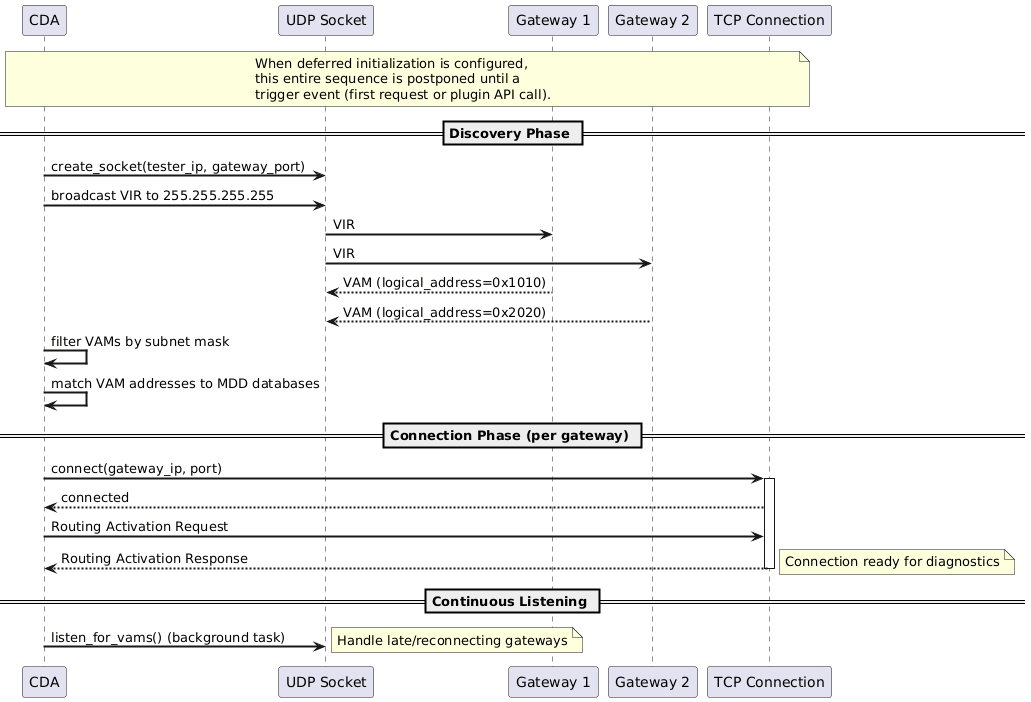
The DoIP gateway establishes communication with vehicle DoIP entities through a discovery and connection establishment protocol defined in ISO 13400.

Note

When deferred initialization is configured (see Communication Initializatio... (arch~dt-deferred-initialization)), the entire DoIP gateway initialization described below is postponed until a trigger event occurs. When health monitoring is enabled, the health provider for the DoIP component remains in “Pending” state until initialization is triggered.

Socket Creation

A UDP socket is created and bound to the configured tester address and gateway port. The socket is configured with:

  • Broadcast capability enabled

  • Address reuse enabled (and port reuse on Unix systems)

  • Non-blocking mode for async operation

Vehicle Identification

The gateway broadcasts a Vehicle Identification Request (VIR) to 255.255.255.255 on the configured gateway port. It then collects Vehicle Announcement Messages (VAM) from responding DoIP entities within a timeout window.

Subnet Filtering

VAM responses are filtered based on the configured subnet mask. Only responses from IP addresses within the tester’s subnet (determined by tester_address AND tester_subnet) are accepted. This prevents discovery of DoIP entities on unrelated networks.

Gateway-to-ECU Mapping

For each discovered gateway (identified by its logical address in the VAM), the system:

  1. Establishes a TCP connection to the gateway’s IP address

  2. Performs routing activation to enable diagnostic communication

  3. Creates send/receive channels for each ECU associated with that gateway

  4. Maps ECU logical addresses to their gateway connection index

Spontaneous VAM Listener

After initial discovery, a background task continuously listens for spontaneous VAM broadcasts. This handles scenarios where:

  • A gateway comes online after initial startup

  • An existing gateway reconnects after temporary disconnection

When a new VAM is received, the system establishes a connection (if not already connected) and triggers variant detection for the associated ECUs.

@startuml
skinparam backgroundColor #FFFFFF
skinparam sequenceArrowThickness 2

participant "CDA" as CDA
participant "UDP Socket" as UDP
participant "Gateway 1" as GW1
participant "Gateway 2" as GW2
participant "TCP Connection" as TCP

note over CDA,TCP
    When deferred initialization is configured,
    this entire sequence is postponed until a
    trigger event (first request or plugin API call).
end note

== Discovery Phase ==
CDA -> UDP: create_socket(tester_ip, gateway_port)
CDA -> UDP: broadcast VIR to 255.255.255.255

UDP -> GW1: VIR
UDP -> GW2: VIR

GW1 --> UDP: VAM (logical_address=0x1010)
GW2 --> UDP: VAM (logical_address=0x2020)

CDA -> CDA: filter VAMs by subnet mask
CDA -> CDA: match VAM addresses to MDD databases

== Connection Phase (per gateway) ==
CDA -> TCP: connect(gateway_ip, port)
activate TCP
TCP --> CDA: connected

CDA -> TCP: Routing Activation Request
TCP --> CDA: Routing Activation Response
note right: Connection ready for diagnostics
deactivate TCP

== Continuous Listening ==
CDA -> UDP: listen_for_vams() (background task)
note right: Handle late/reconnecting gateways
@enduml

.. note:: In case of a TLS required activation response, the connection is reestablished with TLS enabled.

DoIP Gateway Discovery and Connection

3.5.1.4. Communication Initialization Mode

Software Architecture: Communication Initialization Mode arch~dt-deferred-initialization
status: draft

The CDA supports a configurable [communication] init_mode to enable scenarios where the HTTP API must be available before vehicle communication begins, or where communication must remain fully quiet until explicitly authorized.

Dynamic Router Architecture

The HTTP server is launched with a dynamic router that supports adding routes after the server has started. This enables:

  1. Immediate availability of health endpoints during startup (when health feature is enabled)

  2. Deferred registration of SOVD API routes after ECU discovery

  3. Hot-reloading of routes when the diagnostic database is updated at runtime

``init_mode`` Values

  • Always (default): DoIP gateway creation and ECU discovery proceed immediately at startup, as described in Startup Sequence (arch~dt-startup-sequence), always performing a full VIR/VAM broadcast discovery regardless of whether a persisted topology exists (see ECU List Persistence (arch~dt-ecu-list-persistence)). If ECU list persistence is enabled, results are still persisted afterward (topology, states, last_seen), but the persisted topology is never consulted to skip or replace the broadcast discovery itself. This matches the CDA’s established default behavior prior to the introduction of ECU list persistence.

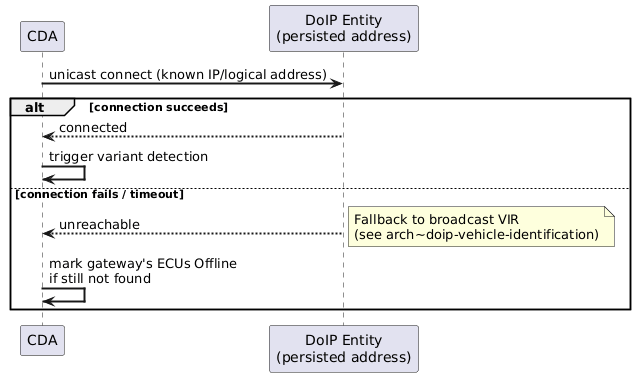
  • WhenNotPersisted: DoIP gateway creation and ECU discovery proceed immediately at startup, but a full VIR/VAM broadcast discovery is only performed when no persisted topology is available (e.g. on the first-ever startup, or any time after the persisted topology has been cleared). Whenever a persisted topology exists, the CDA instead attempts a direct (unicast) DoIP connection to each persisted gateway’s known network address, skipping the broadcast VIR step; if a gateway cannot be reached at its persisted address, the CDA falls back to broadcast-based discovery for that specific gateway, as described in Vehicle Identification (arch~doip-vehicle-identification), before marking its ECUs as Offline. Requires ECU list persistence to be enabled; behaves identically to Always if persistence is disabled, since no persisted topology can ever exist in that configuration.

  • OnDemand: DoIP gateway creation and ECU discovery are postponed until one of the following triggers, which intentionally differ in scope:

    • Plugin API (whole-vehicle scope): a custom plugin calls the initialization API based on application-specific conditions (e.g., security unlock, session establishment). This triggers a full initialization of all gateways/ECUs at once, applying the same persisted-vs-broadcast behavior as WhenNotPersisted described above.

    • On-demand (single-ECU scope): the first diagnostic request to a specific ECU endpoint triggers initialization. If a persisted topology exists, this establishes a connection only to that ECU’s gateway (direct reconnect, with broadcast fallback for that gateway alone, as in WhenNotPersisted); other persisted gateways remain unconnected until their own first request. If no persisted topology exists, no gateway network address is yet known, so this necessarily triggers a full, vehicle-wide VIR broadcast, discovering and connecting all gateways at once, since VIR-based discovery is inherently broadcast-based and cannot be scoped to a single ECU.

  • Disabled: DoIP gateway creation and ECU discovery are postponed exactly as in OnDemand mode, except that only an explicitly initiated detection run applies – typically via the networkreset operation executed with trigger_detection=true (see Vehicle Topology Plugin - R... (arch~plugin-vehicle-topology-reset-persistence)), but a plugin or other custom code may equally initiate it directly; the on-demand (first-request) and plugin-API triggers are not recognized in this mode. No socket is opened and no VIR is broadcast until that detection run is explicitly initiated. Once triggered, this always initializes all gateways/ECUs at once (there is no per-ECU auto-trigger in this mode), applying the same persisted-vs-broadcast behavior as WhenNotPersisted.

OnDemand and Disabled always behave like WhenNotPersisted once triggered (at whichever scope applies), rather than offering their own Always/WhenNotPersisted choice, since these modes exist specifically to minimize vehicle network traffic until explicitly authorized.

@startuml
skinparam backgroundColor #FFFFFF
skinparam sequenceArrowThickness 2

participant "CDA" as Startup
participant "DoIP Entity\n(persisted address)" as GW

Startup -> GW: unicast connect (known IP/logical address)
alt connection succeeds
    GW --> Startup: connected
    Startup -> Startup: trigger variant detection
else connection fails / timeout
    GW --> Startup: unreachable
    note right: Fallback to broadcast VIR\n(see arch~doip-vehicle-identification)
    Startup -> Startup: mark gateway's ECUs Offline\nif still not found
end
@enduml

WhenNotPersisted – Reconnect to a Persisted Gateway

Pre-initialization State

While initialization is deferred (OnDemand or Disabled, before their respective trigger fires):

  • When health monitoring is enabled, health endpoints report status for available components (configuration, HTTP server)

  • ECU-specific endpoints return an appropriate status code indicating pending initialization

  • The dynamic router is prepared to receive SOVD routes once initialization completes

  • No spontaneous VAM listener is started (see Spontaneous VAM Handling Mode (arch~doip-vam-handling-mode))

Initialization Sequence

Once triggered, initialization proceeds identically to the immediate initialization path (subject to the Always/WhenNotPersisted distinction described above, and, for OnDemand, scoped to a single gateway or all gateways depending on which trigger fired): DoIP gateway creation (broadcast discovery or direct reconnect), TCP connection establishment, UDS manager creation, and variant detection. Upon completion, SOVD routes are registered and, when health monitoring is enabled, health status transitions to “Up” (for OnDemand’s single-ECU trigger, this refers to the routes/health of the affected gateway only). The resulting topology is persisted as described in ECU List Persistence (arch~dt-ecu-list-persistence), so that subsequent startups can reuse it (unless init_mode is Always).

3.5.1.5. Health Monitoring

Software Architecture: Health Monitoring arch~dt-health-monitoring
status: draft

Health monitoring is an optional build-time feature that provides an HTTP endpoint for querying the aggregate and per-component health status of the CDA. Health status is only retrievable through the health endpoint when this feature is enabled at build time.

Feature Enabled Behavior

When the health feature is enabled:

  1. During the HTTP Server Phase, health routes are registered on the dynamic router immediately after the server starts, making health status queryable before any SOVD API routes are available.

  2. During the Health Registration Phase, component-specific health providers are registered for each major subsystem (main, database, doip). Each provider reports granular status for its component.

  3. The health endpoint returns an aggregate status derived from all registered component providers:

    • Starting: At least one component is in Pending or Starting state

    • Up: All components have successfully initialized

    • Failed: At least one component has failed

  4. Health status transitions occur as components progress through their initialization lifecycle (see health status transitions below).

Feature Disabled Behavior

When the health feature is disabled at build time:

  • No health endpoints are registered on the HTTP server

  • No health providers are created for any component

  • Health status is not retrievable through any endpoint or API

  • All health-related registration steps in the startup sequence are skipped

  • The CDA operates normally without any health monitoring overhead

Component Health Providers

When enabled, the following component health providers are registered:

Health Providers

Component

Key

Failure Condition

Main

main

Fatal startup error

Database

database

No databases loaded

DoIP

doip

Gateway creation failed

Health Status Transitions

@startuml
skinparam backgroundColor #FFFFFF
skinparam stateArrowThickness 2

[*] --> Pending : Component registered\n(initialization not yet started)

Pending --> Starting : Initialization begins
Starting --> Up : Initialization successful
Starting --> Failed : Initialization failed

state Pending {
}

state Starting {
}

state Up {
}

state Failed {
}

note right of Pending
  Used for components whose initialization
  is deferred (e.g., DoIP gateway when
  deferred initialization is configured).
  Pending and Starting both contribute to
  an overall "Starting" aggregate status.
end note
@enduml

Component Health State Transitions

3.5.2. ECU Detection and Variant Detection

3.5.2.1. ECU Discovery

Software Architecture: ECU Discovery arch~dt-ecu-discovery
status: draft
links incoming: req~dt-ecu-discovery

ECU discovery establishes the mapping between diagnostic database definitions (MDD files) and physical DoIP communication endpoints.

Database-to-Gateway Mapping

During database loading, each ECU’s logical gateway address is extracted from the MDD. A mapping structure is built that associates each gateway logical address with the list of ECU logical addresses accessible through it.

VAM Matching

When a VAM is received, its logical address is matched against the ECU addresses from loaded databases. A match indicates that the ECU defined in the MDD is physically present and reachable through the responding gateway.

Connection Association

For discovered ECUs, the system maintains:

  • A mapping from ECU logical addresses to their gateway connection index

  • A list of active gateway connections with per-ECU send/receive channels

This structure enables routing diagnostic messages to the correct gateway and ECU.

ECU Name Mapping

A secondary mapping tracks ECU names to logical addresses for supporting SOVD API requests that reference ECUs by name rather than address. This associates each gateway logical address with the list of ECU names accessible through it.

Duplicate Address Detection

ECUs sharing the same logical address (from different MDD files with different ECU names) are tracked as potential duplicates. Each ECU manager stores references to other ECU names that share the same address. Variant detection determines which ECU definition is correct for the physical ECU.

3.5.2.2. Variant Detection

Software Architecture: Variant Detection arch~dt-variant-detection
status: draft
links incoming: req~dt-variant-detection

Variant detection identifies the correct ECU software variant from multiple possible definitions by querying the ECU and matching responses against defined patterns.

Detection Request Channel

A message channel connects the DoIP gateway to the UDS manager for variant detection coordination. When a VAM is received (either during startup or from spontaneous announcements), the gateway sends a list of ECU names requiring variant detection through this channel.

Asynchronous Detection

Variant detection runs asynchronously to avoid blocking startup. A dedicated task receives ECU names from the channel and spawns individual detection tasks per ECU. This enables parallel variant detection across multiple ECUs.

Detection Process

For each ECU requiring variant detection:

  1. Prepare: Extract the set of diagnostic services required for variant identification from the MDD variant patterns (services referenced in matching_parameter elements)

  2. Execute: Send each diagnostic service request to the ECU and collect responses

  3. Evaluate: Match response parameter values against variant patterns. A variant matches when all its matching_parameter conditions are satisfied (expected value equals received value for the specified output parameter)

  4. Update State: Set the ECU state based on detection result (Online, Offline, NoVariantDetected, or Duplicate)

Duplicate Resolution

When multiple ECU definitions share the same logical address, variant detection determines which definition matches the physical ECU. The matching ECU transitions to Online state; non-matching ECUs with the same address transition to Duplicate state and their databases are effectively disabled.

Fallback Behavior

When variant detection fails to find a matching pattern:

  • If fallback_to_base_variant is enabled: The ECU uses the base variant definition and transitions to NoVariantDetected state

  • If disabled: The ECU remains in NotTested state with an error logged

3.5.2.3. ECU States

Software Architecture: ECU States arch~dt-ecu-states
status: draft
links incoming: req~dt-ecu-states

ECU state management tracks the lifecycle of each ECU from registration through variant detection and ongoing communication.

States

The following states are maintained:

  • NotTested: Initial state after registration; variant detection has not yet been performed

  • Online: ECU is reachable and variant has been successfully detected

  • AssumedOnline: ECU was registered from a persisted ECU topology (see ECU List Persistence (arch~dt-ecu-list-persistence)) with a last known state of Online, but has not yet been contacted in the current session

  • NoVariantDetected: ECU is reachable but no matching variant pattern was found

  • Duplicate: ECU shares its logical address with another ECU identified as the correct variant

  • Offline: ECU was tested but could not be reached; it has never been successfully online since registration or last re-detection

  • Disconnected: ECU was previously online but communication has been lost

The distinction between Offline and Disconnected reflects whether the ECU has ever been successfully communicated with. An ECU that fails its first contact attempt transitions to Offline; an ECU that was previously Online, NoVariantDetected, Disconnected, or AssumedOnline and loses (or fails to establish) communication transitions to Disconnected – since, in all of these cases, the ECU is known to have been reachable at some point (either in the current session, or, for AssumedOnline, according to the persisted topology from a previous session).

External Representation

The AssumedOnline state is an internal-only distinction. Externally, via the SOVD API (see Components Entity Collection (arch~sovd-api-components-entity-collection) and Vehicle Topology Plugin - R... (arch~plugin-vehicle-topology-retrieval)), an ECU in the AssumedOnline state is reported with connectivity state Online, so that clients do not need to be aware of whether the ECU has actually been contacted in the current session. The last_seen timestamp (see State Storage below) allows clients to judge how current that information is.

State Storage

ECU state is maintained within the ECU manager structure, which wraps the diagnostic database and adds runtime state information. The state is queryable through the SOVD API component endpoints.

In addition to the state enum, each ECU manager stores a last_seen timestamp, updated whenever a diagnostic exchange with the ECU succeeds (e.g. a successful variant detection response, or a successful diagnostic service response during normal operation). For ECUs registered in the AssumedOnline state, the initial value of last_seen is taken from the persisted topology (see ECU List Persistence (arch~dt-ecu-list-persistence)) and reflects the last successful contact from a previous session.

State Transitions

State transitions are triggered by:

  • DoIP Events: VAM reception, connection establishment/loss, routing activation success/failure

  • Variant Detection: Detection success, failure, or duplicate identification

  • API Requests: Explicit re-detection requests via POST to ECU endpoint

  • Communication Errors: Timeout, NACK, or connection closure during diagnostic requests

  • Persisted Topology Load: Registration of an ECU from a persisted topology with last known state Online transitions it directly to AssumedOnline instead of NotTested

Concurrent Access

ECU state is protected by a read-write lock to enable concurrent read access from multiple API handlers while ensuring exclusive write access during state transitions. The database map associates each ECU name with its concurrency-protected state manager.

State Query

The SOVD API exposes ECU state through the component collection endpoint. Clients can query individual ECU status or list all ECUs with their current states. The state (with AssumedOnline mapped to Online) and the last_seen timestamp are included in the component response to inform clients of ECU availability.

3.5.3. ECU List Persistence

3.5.3.1. ECU List Persistence

Software Architecture: ECU List Persistence arch~dt-ecu-list-persistence
status: draft

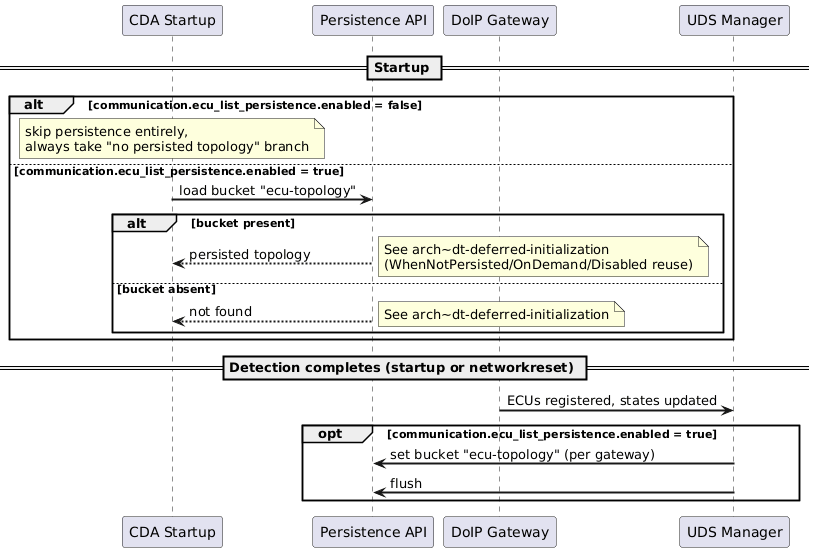
The detected ECU/gateway topology is persisted on top of the generic Persistence API (see Persistence API (arch~system-persistence-api)), so that the CDA does not have to unconditionally rediscover it on every startup.

Enable/Disable Configuration

A configuration flag (communication.ecu_list_persistence.enabled, default false) gates this entire feature. When left at false (the default), the ecu-topology bucket is never read at startup and never written (neither after a detection run nor at shutdown, see ECU List Persistence - Shut... (arch~dt-ecu-list-persistence-shutdown)). The CDA startup path always takes the “no persisted topology” branch in that configuration (see Communication Initializatio... (arch~dt-deferred-initialization)), and the AssumedOnline state can never be entered.

Bucket Layout

A dedicated Bucket (e.g. ecu-topology) is used. One entry is stored per gateway, keyed by the gateway’s logical address. Each value serializes:

  • The gateway’s network address and logical address

  • The list of ECUs reachable through that gateway, each with its logical address, name, last known variant, last known state, and last_seen timestamp (see ECU States (arch~dt-ecu-states))

@startuml
skinparam backgroundColor #FFFFFF
skinparam sequenceArrowThickness 2

participant "CDA Startup" as Startup
participant "Persistence API" as Persist
participant "DoIP Gateway" as DOIP
participant "UDS Manager" as UDS

== Startup ==
alt communication.ecu_list_persistence.enabled = false
    note over Startup: skip persistence entirely,\nalways take "no persisted topology" branch
else communication.ecu_list_persistence.enabled = true
    Startup -> Persist: load bucket "ecu-topology"
    alt bucket present
        Persist --> Startup: persisted topology
        note right: See arch~dt-deferred-initialization\n(WhenNotPersisted/OnDemand/Disabled reuse)
    else bucket absent
        Persist --> Startup: not found
        note right: See arch~dt-deferred-initialization
    end
end

== Detection completes (startup or networkreset) ==
DOIP -> UDS: ECUs registered, states updated
opt communication.ecu_list_persistence.enabled = true
    UDS -> Persist: set bucket "ecu-topology" (per gateway)
    UDS -> Persist: flush
end
@enduml

ECU Topology Persistence

Write Timing

The persisted topology is written after a detection run completes – both after the initial startup detection (unless deferred/disabled without a trigger having fired yet, see Communication Initializatio... (arch~dt-deferred-initialization)) and after a networkreset execution that triggers detection (see Vehicle Topology Plugin - R... (arch~plugin-vehicle-topology-reset-persistence)). This applies regardless of whether init_mode is Always or WhenNotPersisted – a detection run’s results are always persisted when it occurs; only WhenNotPersisted additionally uses the persisted data to decide whether to skip that detection run in the first place. A flush is issued to guarantee durability of the persisted data. This write is skipped entirely when communication.ecu_list_persistence.enabled is false.

Read Timing

The persisted topology is read once, early during the Vehicle Data Loading Phase of Startup Sequence (arch~dt-startup-sequence), before deciding whether to perform a full broadcast discovery or reuse the persisted data (relevant for init_mode = WhenNotPersisted, or once triggered for OnDemand/Disabled, see Communication Initializatio... (arch~dt-deferred-initialization)). This read is skipped entirely when communication.ecu_list_persistence.enabled is false, in which case a full broadcast discovery unconditionally applies with no persisted topology available.

When ECUs are registered from a persisted topology, an ECU whose persisted state was Online is registered in the AssumedOnline state (see ECU States (arch~dt-ecu-states)), with its last_seen timestamp initialized from the persisted value.

3.5.3.2. ECU List Persistence - Shutdown Update

Software Architecture: ECU List Persistence - Shutdown Update arch~dt-ecu-list-persistence-shutdown
status: draft

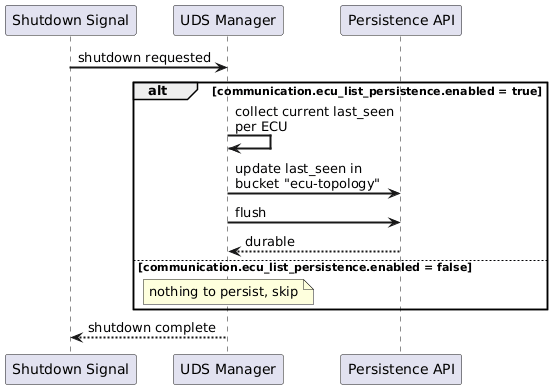
The last_seen timestamp maintained per ECU (see ECU States (arch~dt-ecu-states)) changes far more frequently than the rest of the persisted topology (on every successful diagnostic response), so it is not flushed to the Persistence API on every update.

Instead, the in-memory last_seen values are written back to the ecu-topology bucket as part of the graceful shutdown sequence (triggered by the shared shutdown signal, see Startup Sequence (arch~dt-startup-sequence)), immediately before the persistence provider is closed. A final flush is issued after this update to guarantee durability. This shutdown write-back is skipped entirely when communication.ecu_list_persistence.enabled is false (see ECU List Persistence (arch~dt-ecu-list-persistence)), since there is no persisted bucket to update in that configuration.

@startuml
skinparam backgroundColor #FFFFFF
skinparam sequenceArrowThickness 2

participant "Shutdown Signal" as Signal
participant "UDS Manager" as UDS
participant "Persistence API" as Persist

Signal -> UDS: shutdown requested
alt communication.ecu_list_persistence.enabled = true
    UDS -> UDS: collect current last_seen\nper ECU
    UDS -> Persist: update last_seen in\nbucket "ecu-topology"
    UDS -> Persist: flush
    Persist --> UDS: durable
else communication.ecu_list_persistence.enabled = false
    note over UDS: nothing to persist, skip
end
UDS --> Signal: shutdown complete
@enduml

last_seen Persistence at Shutdown

Rationale

Deferring the persistence of last_seen to shutdown avoids a flush (and associated flash write) on every diagnostic response, while still ensuring that, barring an unclean shutdown (e.g. power loss), the timestamp available after a restart reflects the most recent contact from the previous session. In case of an unclean shutdown, the persisted last_seen simply remains at its last successfully flushed value, which is still a valid (if slightly stale) lower bound on the actual last contact time.

3.5.4. Error Handling

Software Architecture: Startup Error Handling arch~dt-error-handling
status: draft
links incoming: req~dt-error-handling

The CDA implements graceful degradation during startup to maximize availability even when individual components fail.

Error Type Hierarchy

Application errors are categorized through a structured error type hierarchy. The following error types are relevant during startup:

  • InitializationFailed: Critical startup failure (e.g., socket creation failed)

  • ConfigurationError: Invalid configuration (prevents startup)

  • ConnectionError: DoIP connection issues (per-gateway, non-fatal)

  • ResourceError: Database loading issues (per-file, non-fatal)

  • DataError: MDD parsing issues (per-file, non-fatal)

Additionally, the following error types may occur during runtime after startup has completed:

  • RuntimeError: Errors during diagnostic operations (e.g., UDS communication failures, variant detection errors)

  • NotFound: Requested resource (ECU, service, parameter) could not be found

  • ServerError: Internal server errors during request processing

Component Health Integration

When health monitoring is enabled (see Health Monitoring (arch~dt-health-monitoring)), component failures are reflected through health provider status transitions. Health providers and their status transitions are defined in the health monitoring architecture.

Graceful Degradation Behaviors

  • No databases loaded: Configurable via exit_no_database_loaded. When true, the application exits with an error. When false, the CDA continues with an empty ECU list.

  • Individual database failure: Logged and skipped; other databases continue loading.

  • DoIP connection failure: The affected gateway’s ECUs are marked as Offline; other gateways and ECUs remain operational.

  • Variant detection failure: ECU transitions to Offline (if unreachable) or NoVariantDetected state; diagnostic operations may still be attempted with base variant.

  • Deferred initialization failure: When deferred initialization is triggered (by first request or plugin API) and the subsequent DoIP gateway creation or UDS manager creation fails, the error is reported to the caller. When health monitoring is enabled, the DoIP health provider transitions to “Failed” state. The HTTP server and non-ECU endpoints remain operational. Subsequent trigger attempts may retry initialization.

  • Configuration file load failure: The system falls back to default configuration values and logs a warning. Startup continues with defaults, which may be overridden by CLI arguments.

  • Configuration validation failure: Startup is aborted with a descriptive error message.

Shutdown Handling

Shutdown signals (SIGTERM, Ctrl+C) are handled gracefully at any startup phase:

  • During database loading: Loading tasks are aborted and the process exits

  • During DoIP initialization: Connections are not established and the process exits

  • During deferred initialization: If initialization was triggered but not yet complete, in-progress connections are aborted and the process exits

  • After full initialization: The HTTP server completes pending requests before shutdown

All shutdown paths ensure resources are properly released through structured cleanup and tracing guards that flush logs on drop.